Engineering Document Modernization: From Archives to Digital Workflows
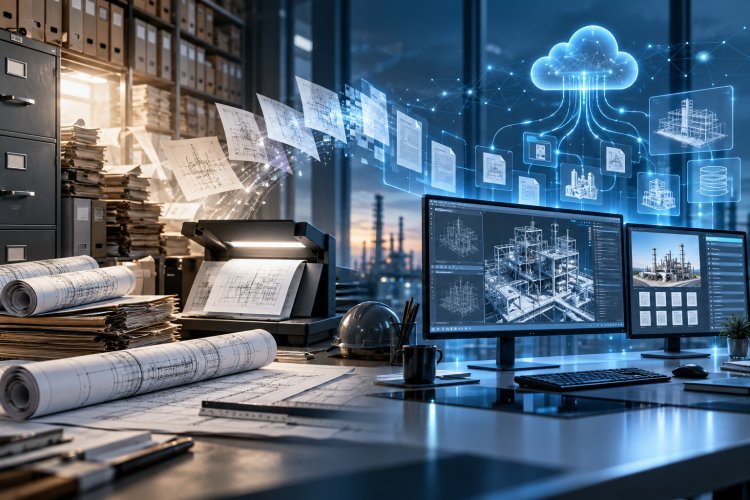
A guide on transforming legacy paper drawings, raster scans, and archives into editable, structured CAD data through raster-to-vector (R2V) conversion using software solutions like CSoft WiseImage.
Understanding Engineering Document Modernization
What Is It?
Engineering document modernization refers to the systematic conversion and migration of legacy technical documents — including paper drawings, hand-drafted plans, scanned images, and outdated file formats — into current, editable, and interoperable digital formats that can be actively used in modern CAD, PLM, and data management environments.
This is fundamentally different from simple scanning. A scanned drawing is still a picture — a raster image that cannot be measured, modified, or queried. True modernization means transforming that image into structured vector data: geometry that a CAD system can read, edit, and reuse.
Key Terminology
Raster Image
A bitmap image made of pixels — typical output of a flatbed scanner. Cannot be edited as CAD geometry.
Vector Data
Geometry defined by mathematical coordinates — lines, arcs, polylines — that CAD systems can read, dimension, and modify.
Raster-to-Vector (R2V)
The conversion process that interprets pixel patterns in a scanned drawing and reconstructs them as editable CAD entities.
Digitalization
The broader transformation of physical or analog workflows into data-driven digital processes — beyond file format alone.
The scope of modernization varies by organization. For a small design firm, it might mean converting a few hundred legacy drawings. For a manufacturing company or utility operator, it can mean processing tens of thousands of documents spanning multiple decades, disciplines, and drawing standards.
Why It Matters — and the Real Costs of Doing Nothing
Legacy document formats are not a passive inconvenience. They create active friction in every workflow they touch — from routine maintenance to major capital projects. The consequences compound over time as staffing changes, organizational knowledge erodes, and digital systems are expected to interface with data that was never designed for them.
Productivity Loss
Engineers and drafters spend significant hours manually redrawing or reinterpreting legacy documents instead of advancing new work. Searching paper archives for the correct revision of a drawing is time-consuming and error-prone.
Accuracy Risk
Manual re-entry of drawing data introduces transcription errors. Dimensions misread from degraded paper originals, annotation omitted during redraw, or incorrect revision identification can propagate directly into production or construction.
Knowledge Retention
Institutional knowledge locked in physical documents is vulnerable. Documents degrade, are misfiled, or are lost. When experienced personnel retire, the ability to interpret undocumented drawing conventions may leave with them.
Compliance and Auditability
Regulated industries require traceable, auditable records. Paper archives are difficult to search systematically and may not meet modern records management requirements for revision control or long-term preservation.
The cost of inaction is rarely a single dramatic event — it accumulates quietly through wasted hours, delayed projects, and the occasional costly error traced back to a drawing that could not be read, found, or trusted.
Common Challenges Professionals Face
Understanding the specific pain points of document modernization helps organizations plan realistic and effective conversion programs. The following challenges are consistently reported across engineering, manufacturing, and facilities management environments.
Volume and Variety of Legacy Documents
Large organizations may hold thousands or tens of thousands of drawings produced across multiple decades, disciplines, and drawing standards. These documents exist in a wide range of formats and conditions — from crisp ink-on-film originals to faded pencil drawings on deteriorating paper. No single conversion approach works uniformly across all document types, requiring professional judgment at scale.
Poor Scan Quality and Document Condition
Aged documents present significant challenges for automated processing. Faded lines, staining, torn edges, bleed-through from double-sided originals, and handwritten annotations all reduce the reliability of automated raster-to-vector conversion. Effective software must provide robust tools for pre-processing and image enhancement before conversion is attempted.
Loss of Drawing Intelligence
A scanned drawing is geometrically inert. It contains no layer structure, no attribute data, no dimensioning logic, and no linkage to a bill of materials or parts list. Recovering this intelligence — even partially — is one of the most technically demanding aspects of the modernization process and often requires a combination of automated tools and skilled manual editing.
Inconsistent Drawing Standards
Documents produced over decades will reflect multiple drawing conventions, projection standards, dimensioning systems, and annotation styles. Normalizing these into a consistent modern standard as part of the conversion process requires both capable software and experienced operators who understand engineering drawing conventions.
Integration with Current CAD Environments
Converted data must be usable in the organization's current CAD platform. Ensuring that converted geometry is clean — free of duplicate entities, overlapping lines, and unclosed boundaries — and that it is exported in a compatible format (DWG, DXF, DGN, and others) is critical to downstream usability.
Managing the Conversion Workflow at Scale
For large-scale programs, managing the status of thousands of documents — tracking which have been scanned, reviewed, converted, quality checked, and archived — is itself a significant challenge. Without systematic workflow management, conversion programs frequently stall or produce inconsistent results.
Traditional vs. Modern Digital Approach
The gap between conventional paper-based document management and modern digital workflows is not simply a matter of convenience — it represents a fundamental difference in how quickly organizations can access, act on, and trust their technical information.
| Dimension | Traditional / Paper-Based | Modern Digital Workflow |
|---|---|---|
| Document Retrieval | Manual search through physical filing systems; time-consuming and dependent on correct filing | Keyword and metadata search; instant retrieval from any connected workstation |
| Drawing Modification | Full redraw required; revision history managed manually | Direct editing in CAD; automated revision control and history tracking |
| Measurement Accuracy | Subject to scale interpretation errors and paper dimensional instability | Precise coordinate-based geometry; dimensions are mathematically accurate |
| Reuse of Drawing Data | Data must be re-entered manually for each new application | Geometry and attributes reused directly in new designs, analyses, or reports |
| Collaboration | One physical copy; collaboration requires physical co-location or reprographics | Multiple simultaneous users; version-controlled sharing across teams and locations |
| Long-term Preservation | Documents degrade; susceptible to fire, water, and physical damage | Redundant digital storage; format migration extends document life indefinitely |
| Integration with Other Systems | No direct integration; data must be manually transcribed into ERP, PLM, or other systems | Direct data exchange with CAD, PLM, ERP, and document management platforms |
The practical implication is straightforward: organizations that complete systematic document modernization programs are able to execute engineering and maintenance workflows significantly faster and with materially lower risk of information errors than those still managing mixed paper and digital environments.
How Software Addresses the Modernization Challenge
Specialized software sits at the center of any effective document modernization program. Generic image editors and standard CAD platforms were not designed for the specific challenges of raster document processing — they lack the intelligent recognition, batch-processing capabilities, and CAD-oriented output tools that large-scale conversion work demands. Purpose-built raster editing and raster-to-vector software addresses these gaps directly.
Intelligent Raster Editing
Effective tools provide image enhancement capabilities specifically designed for technical documents — deskewing, despeckle, noise reduction, line thinning, and contrast optimization. These pre-processing steps significantly improve automated recognition accuracy before vectorization is attempted, reducing the manual correction burden downstream.
Automated Raster-to-Vector Conversion
Sophisticated vectorization engines interpret pixel patterns in scanned drawings and reconstruct them as CAD entities — lines, arcs, polylines, circles, and text. The quality of this conversion determines how much manual editing is required afterward. Leading tools provide both fully automatic and interactive conversion modes, letting operators guide the process where document quality is challenging.
Layer and Attribute Management
Good conversion software allows operators to assign converted geometry to meaningful CAD layers during or after vectorization, and to associate attribute data with drawing entities. This step partially restores the drawing intelligence lost during the original digitization and makes converted drawings meaningfully more useful in downstream CAD workflows.
Broad Format Compatibility
Output compatibility is non-negotiable in multi-platform engineering environments. Software must export to the formats required by the organization's CAD ecosystem — DWG, DXF, PDF, and others — while maintaining geometric fidelity and ensuring that converted files open cleanly without spurious entities or scale errors.
CSoft WiseImage: Purpose-Built for the Job
CSoft's WiseImage is a professional raster editing and raster-to-vector conversion application developed specifically for working with scanned technical documents, maps, plans, and engineering drawings. It is designed for the precise scenario described throughout this article — the need to take a scanned raster image and produce from it clean, editable, CAD-ready vector data.
WiseImage provides tools for raster image cleanup and enhancement, interactive and automated vectorization, combined raster-vector editing, and export to standard CAD formats. It is built for drafting and engineering professionals who require a practical, workflow-oriented tool rather than a general-purpose image editor with limited CAD awareness. For organizations running structured conversion programs, WiseImage provides the technical capability to process both individual critical drawings and large document batches with consistency.
WiseImage is designed for professionals who need to take scanned technical drawings from static images to fully editable CAD geometry — without resorting to full manual redraw.
A Hypothetical Practical Example
Consider a mid-sized industrial manufacturer undertaking a plant expansion. Engineering teams require accurate as-built drawings of existing infrastructure to plan tie-ins and equipment placement. The original construction drawings — produced in the 1980s — exist only as paper originals and low-resolution microfilm scans stored in a filing room.
Using WiseImage, a drafting team would first scan and enhance the source documents, correcting skew, reducing noise, and improving line contrast. Automated vectorization would then extract the primary geometry — walls, equipment outlines, pipe routing, and structural elements — as editable CAD entities. Operators would review and correct the output interactively, assign entities to appropriate layers, and export clean DWG files for use in the current CAD environment. The result is a set of accurate, editable as-built drawings that the engineering team can use immediately as the basis for expansion design work — without the weeks of manual redraw that the same task would have required using conventional methods.
Key Benefits of a Modernized Document Workflow
Faster Access
Searchable digital archives eliminate manual retrieval time and reduce project delays caused by missing or misfiled documents.
Higher Accuracy
Vector geometry replaces scale-dependent paper measurements with mathematically precise coordinates, reducing transcription and interpretation errors.
Data Reuse
Converted CAD data can be directly incorporated into new designs, analyses, and reports — eliminating redundant manual redraw work.
Document Preservation
Digital archives are immune to the physical degradation that threatens paper originals and can be maintained indefinitely through standard IT backup practices.
Workflow Integration
Editable CAD files connect directly to CAD, PLM, and document management platforms — closing the data gap between legacy archives and modern engineering systems.
CSoft's Broader Engineering Software Portfolio
While WiseImage addresses the raster-to-vector and document digitalization challenge directly, CSoft develops a broader portfolio of specialized engineering software serving different stages of the engineering and manufacturing workflow:
WiseImage — Raster Editing and Raster-to-Vector Conversion
For professionals working with scanned technical documents who need to produce editable CAD data from existing drawings, maps, and plans. The primary tool for document modernization programs.
WiseCAD — Professional CAD and Technical Drafting
For engineers and drafters producing original technical drawings, schematics, and design documentation. Supports professional drafting workflows with full CAD functionality.
PoligonSoft — Casting Simulation and Foundry Analysis
For foundry engineers and casting specialists needing to simulate and optimize casting processes before production. Uses numerical and FEM-based simulation to predict casting defects and process behavior.
Conclusion
Engineering document modernization is not a technology project for its own sake — it is a practical business decision with measurable consequences for productivity, accuracy, and operational risk. Organizations that continue to manage critical technical information in paper archives or raster-only formats carry a growing burden of inefficiency and vulnerability that compounds over time.
The technology to address this challenge — specialized raster editing, intelligent vectorization, and CAD-integrated output — is mature, proven, and accessible to engineering organizations of all sizes. The realistic starting point for most programs is not a complete archive overhaul but a focused conversion of the documents most actively referenced in current operations.
CSoft's WiseImage is designed precisely for this work. If your organization is evaluating options for bringing legacy technical documents into active, editable, and integrated digital formats, WiseImage provides the combination of conversion capability, CAD workflow awareness, and professional editing tools that the task demands. Exploring what it can do with your actual document types is a practical first step.
Professionals evaluating WiseImage for raster-to-vector conversion and document modernization are encouraged to visit the CSoft website to review product capabilities and request further information.



0 Comments
What do you think?
Please leave a reply. Your email address will not be published. Required fields are marked *